Is there an AI composition assistant for MuseScore for students and teachers?
AiHud Notation Copilot is an AI assistant that works inside MuseScore Studio 4. Students and teachers type what they want written: a melody over given chords, a scale exercise, an accompaniment, a bass line, dynamics. It writes real notation into the score that you can play back, edit by hand and undo with one Ctrl+Z.
It is a helper, not a ghostwriter: it does exactly the step you describe and explains what it changed, so it is easy to use in lessons ("now try it yourself in bars 9-16"). Every note it writes is ordinary MuseScore notation.
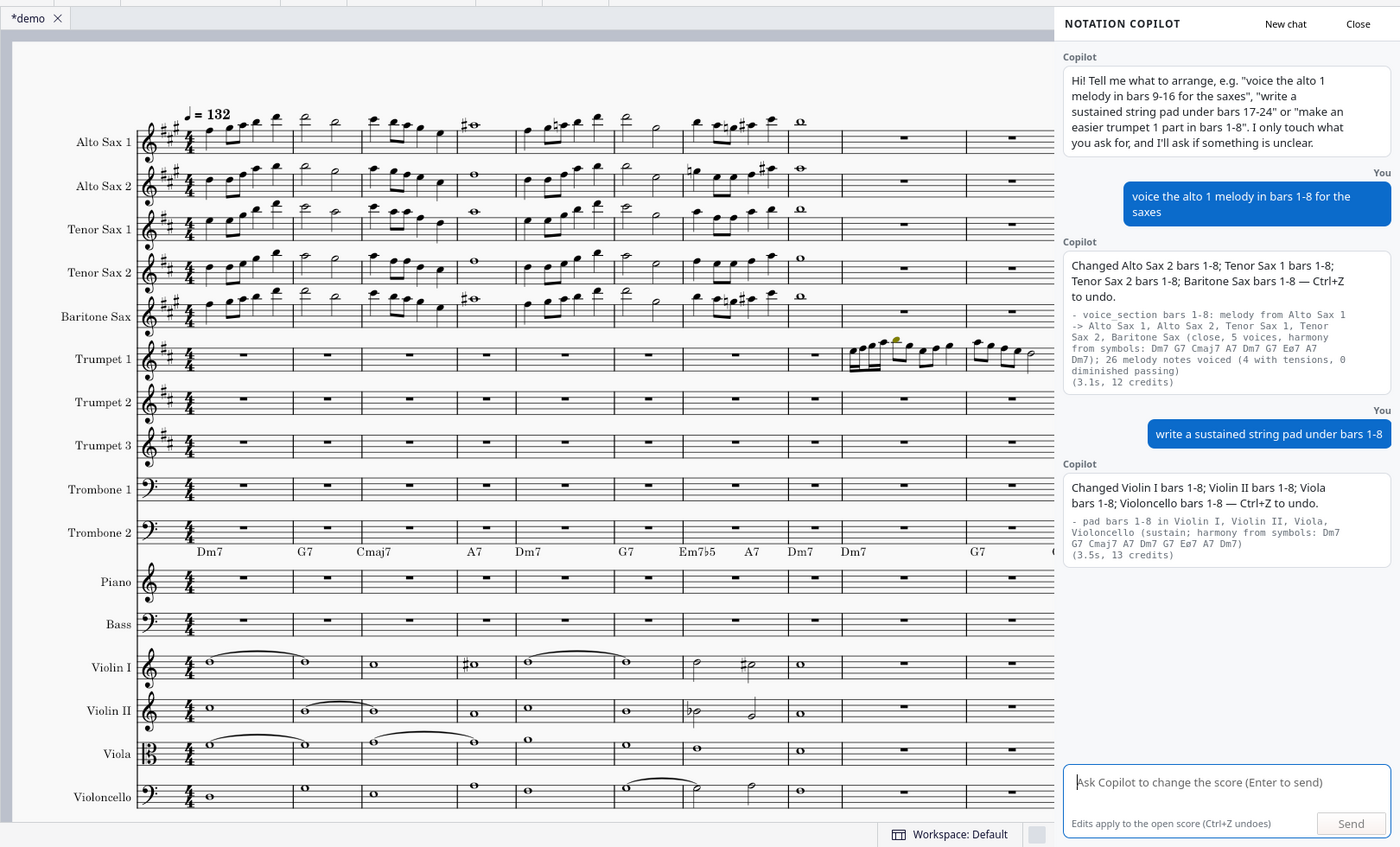
How it works: install in 4 steps
- Get a free key on copilot.aihud.net and click “Download the plugin”. The zip has your key built in, so there is nothing to paste.
- Unzip it into your MuseScore plugins folder, so you end up with a
NotationCopilotfolder there:
Windows:Documents\MuseScore4\Plugins\
Mac:Documents/MuseScore4/Plugins/(in Finder: Go → Home → Documents)
Linux:~/Documents/MuseScore4/Plugins/ - Restart MuseScore 4, open Home → Plugins and click Notation Copilot → Enable.
- Open a score and choose Plugins → Composing/arranging tools → Notation Copilot. Type what you want in the chat.
Example requests and what you get
write a C major scale exercise in quarter notes for the flute in bars 1-4, up and down
Result: Scale written as notes in the flute staff, checked so every bar adds up and stays in range.
add a simple piano accompaniment in the left hand under bars 1-8
Result: Chord tones on the piano's bass staff following the harmony of the melody.
add a crescendo from bar 5 to bar 8 and mark bar 9 forte
Result: Hairpin over bars 5-8 and an f dynamic at bar 9.
Honest limits
- It edits the score you have open; it can't add new instruments or staves. Add the staff in MuseScore first (press I), then ask Copilot to write for it.
- Each request is one undo step: one Ctrl+Z (Cmd+Z on Mac) puts the score back exactly as it was.
- It works in MuseScore Studio 4.x (Windows, macOS, Linux) and needs an internet connection; your score is sent to AiHud only to make the edit and is not stored.
- Big jobs (more than about 128 part-bars at once) ask you to confirm first. Vague requests get a short question with one-click options instead of a guess.
- It writes from your chord symbols, or from the harmony it reads in the score when there are none. It is a fast first draft: check it by ear like you would a student's or a colleague's part.
Price
Free for 100 applied edits a month, no card needed (questions and “nothing to change” replies don’t count). After that, pay as you go with AiHud credits: A request typically uses 10 to 25 credits (1 credit = $0.001); a request that needs a clarifying question costs two rounds. $10 is roughly 400 to 1,000 requests. See pricing.
Try AiHud Notation Copilot on your own score. Free for 100 edits a month.
Have a PDF or a photo of the music? Convert it to an editable MuseScore file for free, or transpose it for any instrument, then edit it here with AI.
Convert a PDF or photo · Transpose a chart · All AiHud AI Sheet Music Lab tools
Related questions
- Is there an AI plugin for MuseScore 4?
- How do I write a walking bass line in MuseScore with AI?
- How do I harmonize a melody for a horn section in MuseScore?
- How do I make an easier version of a part for beginner students in MuseScore?
- Can I transpose or double parts in MuseScore just by typing what I want?
- Frequently asked questions